PSP and EarlyStart Exams (SE00) are tomorrow, Monday 21SEP2026 starting at 08:00 am.
Here is the Timetable.
Here is the Exam Room List.
PSP and EarlyStart Exams (SE00) are tomorrow, Monday 21SEP2026 starting at 08:00 am.
Here is the Timetable.
Here is the Exam Room List.
As many of you will have realised, our website was compromised yesterday, Thursday 17SEP2026. The attack started at about 10:15 am and was neutralised by 03:45 pm. No passwords or any data were exposed in this situation. We apologise for the disruption, which was mainly in the form of spam adverts on our Latest News page for a German casino which were propagated to our Telegram feed.
We are working on securing our site further and hope that we have contained the problem.
At LES Loueizeh we have a policy of swapping classes every year. If you would like to see which class your child is in for 2026 – 2027, log onto schoolpayments.lesbg.com with your LESSON username and password (71 183 559 if you do not know either of these). You will see your child’s class (Junior and Infant are correct at the time of posting; Senior to follow over the weekend) in the section above all the financial details, as shown in the clip below :
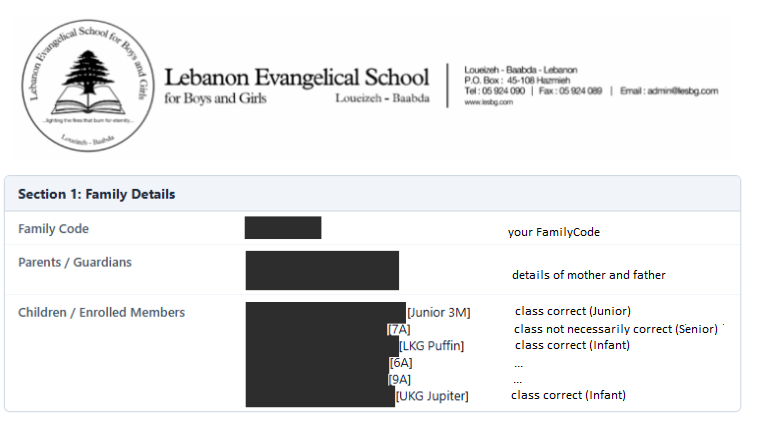
Once class lists have been published, they will not be changed.
Here is the timetable for all the PSP and EarlyStart classes that start tomorrow, Monday 14SEP2026.
EarlyStart classes are : 10A, 11A, 12A, 12M Now joined by 12E, 12SE and 12D
Classes start at 08:00 am and run until 12:40 pm. Five classes of 50 minutes each with a break between 10:30 and 11:00 am.
NOTE for PSP students : In order to make sure that you attend the correct PSP class, you need to go to the PSP class of the class you were in LAST (2025-2026) year. So if you were in Junior 3 last year, you must attend the Junior 3 PSP class.
Unfortunately, on this critical day, our landlines (05 924090) are down. We are promised a fix soon, but for the moment we have no phones. Please use WhatsApp messages [71 183 559].